Magento 2 WebP Bilder | Automatischer WebP-Converter von Magefan

Magento 2 WebP Bilder | Automatischer WebP-Converter von Magefan 2.5.7 Nulled

Keine Berechtigung zum Herunterladen
Beigetreten
Jan 20, 2022
Nachrichten
120
Reaktionswert
71
Credits
$133
Der Magento 2 WebP Bilder-Extension verbessert die Leistung deiner Online-Store durch automatische Konvertierung und Bereitstellung deiner Produktbilder im modernen WebP-Format. WebP bietet eine bessere Komprimierung als traditionelle Formate wie JPEG und PNG, was zu schnellerem Laden der Seiten und einer verbesserten Benutzererfahrung führt ohne die Bildqualität einzubüßen.https://magefan.com/magento-2-webp-optimized-imagesKernmerkmale:
  • []*[]Automatischer WebP-Konvertierung:Konvertiere alle Produkt- und Kategorienbilder in die WebP-Format ohne manuelle Eingriffe.[]*[]Fallback Unterstützung:Automatisch serviert originale JPEG/PNG-Bilder für Browser, die WebP nicht unterstützen, und sichergestellt vollständige Kompatibilität.[]*[]Bessere Seitenleistung:Bildgrößen reduzieren um bis zu 30-50%, signifikant die Leistung Ihres Sites und die SEO-Rankingsteigerung.[]*[]Einfache Konfiguration:Verwalte die Einstellungen der Erweiterung direkt im Magento-Admin-Panell mit einer benutzerfreundlichen Oberfläche.[]*[]Faster load images helfen zur besseren Suchrangereignis und niedrigeren Abbrechungsrate.[]*[]Keine Auswirkungen auf Originale-Bilder:Original image files bleiben unangetastet, sichere und umkehrbare Bildoptimierung gewährleistend.[]*[]Multiple Bildtypen unterstützt:Mit Bildern von Produkten, Kategorien, CMS-Seiten und Blöcken funktioniert.
Vorteile:
  • []Stärke den Kundenshop-erfahrung mit schnelleren Ladezeiten.[]Stärke Google PageSpeed Insights-Bewertungen und Core-Web-Vitalscoren.[]Reduziere die Bandbreitseneinspektrum und den Serverlast.[][vollständig kompatibel mit der neuesten Versionen von Magento 2.
 
Anhänge
Zuletzt von einem Moderator bearbeitet:
Can you provide a cracked version?
 
Magefan Community Nulled - replace files and enter any key to save.
Magefan Community Nulled - 替换文件并输入任意键保存。
Yes, I replaced the Community moudle with Magefan Community 2.2.17 Nulled moudle,
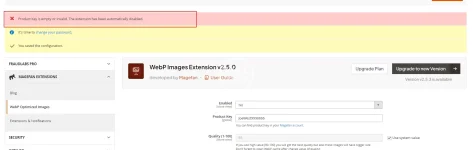
And I deleted the "generated" and "var" directories. After recompiling, the Webp still prompted that it needed to be activated, even though I entered any key in webp Configuration stage.1755479518135.webp
 
Yes, I replaced the Community moudle with Magefan Community 2.2.17 Nulled moudle,
And I deleted the "generated" and "var" directories. After recompiling, the Webp still prompted that it needed to be activated, even though I entered any key in webp Configuration stage.Anhang 108121 einsehen
Hold On ,i will check it.new version this package have more vaild .now please modify code from

PHP:
  final public function validate($data)
    {
        if (isset($data[$this->getModule()])) {
            return !empty($data[$this->getModule()]);
        }
        $k = $this->getKey();
      $result =true;
        return $result;
    }
to
Code:
  final public function validate($data)
    {
          return true;
    }
on file
module-community-2.2.17\Model\Section.php
to fix your issue .
 
Zuletzt bearbeitet:
Hold On ,i will check it.new version this package have more vaild .now please modify code from
稍等,我去检查一下。这个包的新版本有更多有效的功能。现在请修改代码。

PHP:
  final public function validate($data)
    {
        if (isset($data[$this->getModule()])) {
如果 (isset($data[$this->getModule()])) { 
            return !empty($data[$this->getModule()]);
        }
        $k = $this->getKey();
      $result =true;   $result = true;
        return $result;
    }
to
Code:
  final public function validate($data)
    {
          return true;
    }
on file 在文件中

to fix your issue .
解决你的问题。
Thanks for you tell,

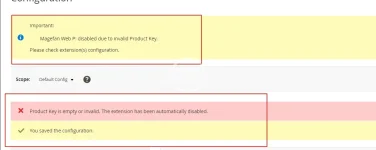
I completed the above modifications and recompiled the code. However, when I accessed the backend page, I found that there was still the error message "Magefan Web P: disabled due to invalid Product Key. Please check the configuration of the extension(s)." Even after I cleared the files and cache and recompiled again, it didn't work.


Besides,
I attempted to remove: </field> <field id="key" translate="label" type="text" sortOrder="30" showInDefault="1" showInWebsite="0" showInStore="0">
<label>Product Key</label>
<frontend_model>Magefan\Community\Block\Adminhtml\System\Config\Form\ProductKeyField</frontend_model>
</field>

On files /Magefan/WebP/etc/adminhtml/system.xml

But,it still didn't work.


1755500547171.webp
 
Thanks for you tell,

I completed the above modifications and recompiled the code. However, when I accessed the backend page, I found that there was still the error message "Magefan Web P: disabled due to invalid Product Key. Please check the configuration of the extension(s)." Even after I cleared the files and cache and recompiled again, it didn't work.


Besides,
I attempted to remove: </field> <field id="key" translate="label" type="text" sortOrder="30" showInDefault="1" showInWebsite="0" showInStore="0">
<label>Product Key</label>
<frontend_model>Magefan\Community\Block\Adminhtml\System\Config\Form\ProductKeyField</frontend_model>
</field>

On files /Magefan/WebP/etc/adminhtml/system.xml

But,it still didn't work.


Anhang 108136 einsehen
No .what is magento version?clear var folder and then try it .i can not tested faild
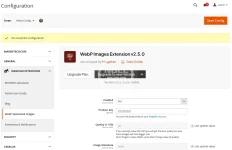
2025-08-18_154124.webp
 
Zuletzt bearbeitet:
Yes, I did clear the var and generated folder, but it still didn't work. My Magento 2 version is 2.4.7-p7.
 
Yes, I did clear the var and generated folder, but it still didn't work. My Magento 2 version is 2.4.7-p7.
Tested version number was 2.4.8 ,no find any issue .if do not modify any code it is work too with new .
Code:
  final public function validate($data)
    {
        if (isset($data[$this->getModule()])) {
            return !empty($data[$this->getModule()]);
        }
        $k = $this->getKey();
      $result =true;
        return $result;
    }
this code only was touch issue when upgrading was happen,make sure your files floder permission .and remove var folder,run setup:up and then tested-
 
Tested version number was 2.4.8 ,no find any issue .if do not modify any code it is work too with new .
Code:
  final public function validate($data)
    {
        if (isset($data[$this->getModule()])) {
            return !empty($data[$this->getModule()]);
        }
        $k = $this->getKey();
      $result =true;
        return $result;
    }
this code only was touch issue when upgrading was happen,make sure your files floder permission .and remove var folder,run setup:up and then tested-
Sometimes it is necessary to restart PHP to update OPCache data. Even if you need to restart Apache or nginx. If your disk has M2 cache, sometimes you also need to restart the server,linux will cache file when lots of files was update or delete .you can find delete ALL twice ,it was really deleted
 
Oben