

- Kurzbeschreibung
- Accept all major debit and credit cards as well as local payment methods and one-click checkout
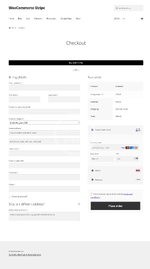
Accept all major debit and credit cards as well as local payment methods and one-click checkout with Link
Benefit from Stripe Elements, which helps your users input their payment information quickly and correctly at checkout
Achieve PCI-DSS compliance with Stripe Elements hosted input fields
Supports Strong Customer Authentication (SCA)
Optimized for mobile and fast checkout with Apple Pay, Google Pay, and Payment Request API support
Better detect and prevent fraud with the help of Stripe Radar and 3D Secure
Easily capture authorizations and process refunds from your WooCommerce Dashboard
Support recurring payments with various payment methods via WooCommerce Subscriptions
Get paid within minutes with Stripe Instant Payouts, if eligible
Benefit from free updates and new innovative functionality as Stripe launches new features and products
Accept payments with Stripe
The Stripe plugin for WooCommerce allows you to accept payments directly on your store for web and mobile. With Stripe, customers stay on your store during checkout instead of being redirected to an externally hosted checkout page, which has been proven to lead to higher conversion rates.
Stripe is a simple way to accept payments online. Stripe has no setup fees, no monthly fees, and no hidden costs. Hundreds of thousands of businesses—ranging from startups to Fortune 500 companies—rely on Stripe’s software tools to securely accept payments and expand globally.
Stripe is available to businesses in 40+ countries. With Stripe, you can accept all major debit and credit cards from customers in every country in 135+ currencies, as well as Apple Pay, Google Pay, and other local payment methods, such as Alipay, iDeal, SEPA Direct Debit, or BNPL methods Klarna, Affirm, and Afterpay/Clearpay.
Find out more in the Stripe WooCommerce Extension documentation.
Features and benefits
A PCI compliant checkout flow optimized for conversion
The Stripe WooCommerce plugin utilizes Stripe Elements to provide you with a PCI-compliant checkout experience that works across browsers and devices of all sizes. Stripe Elements is a set of Stripe hosted input fields built with the collective experience of Stripe’s front-end, design, and analytics teams and help your customers input their information quickly and correctly to minimize user error and increase the number of successful payments. Stripe Elements can be customized to perfectly fit into your theme.
Stripe Elements transmits all sensitive data directly to Stripe without passing through your servers so you remain PCI-DSS compliant. Learn more about Stripe Elements.
Local payment methods to reach customers everywhere
Customer preferences at the time of checkout vary drastically and supporting local payment methods can significantly increase the likelihood of conversion. With Stripe, payment methods can be easily activated from your Stripe Dashboard, no secondary contracts or additional plugins necessary. Once you’ve activated a payment method from your Stripe Dashboard, update your WooCommerce Checkout settings to list the payment method on your checkout page.
Payments made with any payment method on Stripe, including cards, will show up in your Stripe Dashboard, which makes reporting and unified payouts easy. Check out Stripe’s guide to payment methods to discover and select the right payment methods for your customers.


